
01
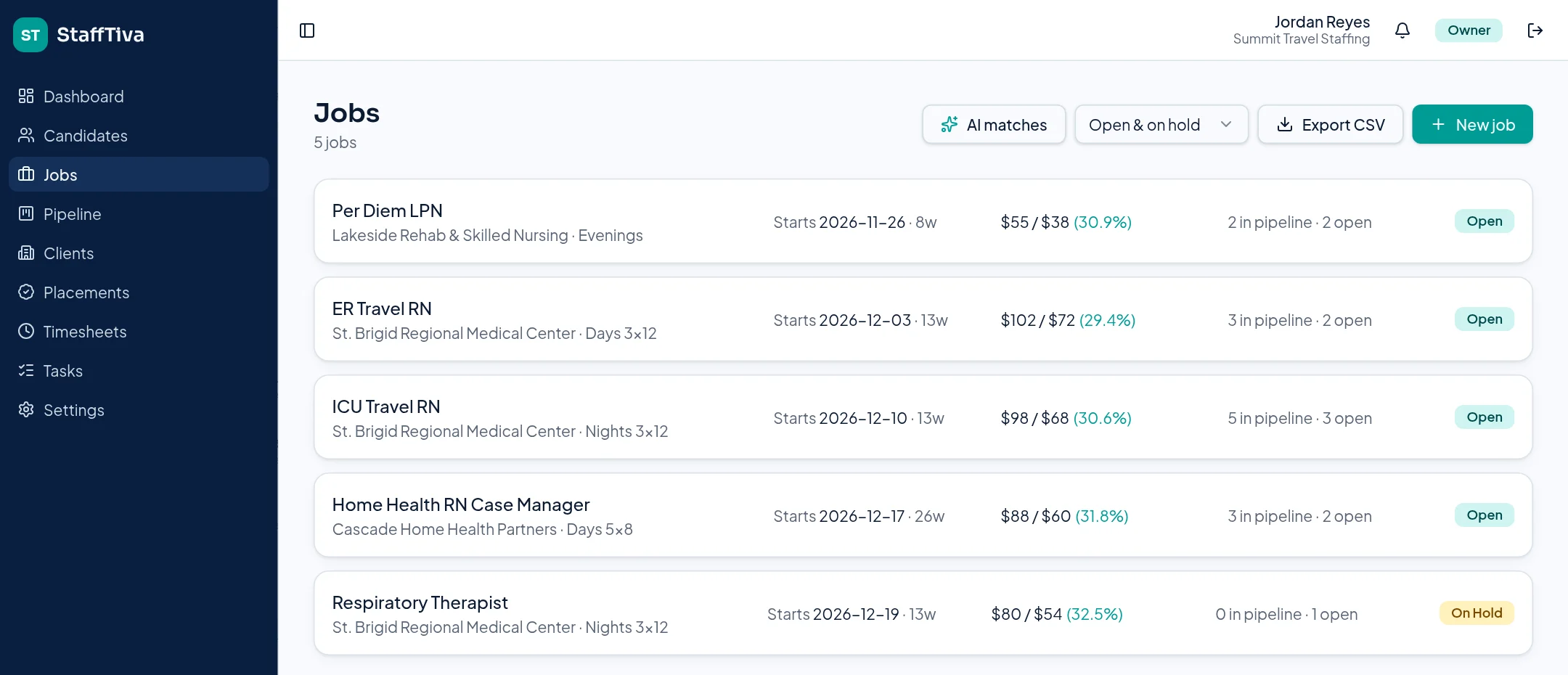
Live job-order margin and placement margin per hour
StaffTiva calculates the bill/pay rate spread and gross-margin percentage on job orders as rates change. Placement records keep hourly margin beside assignment dates and extension status. The dashboard adds estimated monthly margin trends and a client breakdown, so an owner can review economics without building a separate spreadsheet.
Crelate’s published pricing describes reporting, analytics and advanced placement export; its healthcare page describes deployment and compliance visibility. Those pages do not establish an identical live job-order margin calculation. Ask Crelate to demonstrate bill/pay rate changes, hourly placement margin and a client-level trend in the exact package you are evaluating—not assume Crelate lacks those capabilities.
StaffTiva’s hourly figure is a rate spread, not net profit. Dashboard dollar estimates use recorded assignment dates and a 36-hour weekly assumption and exclude payroll burden, housing, benefits and other operating costs.
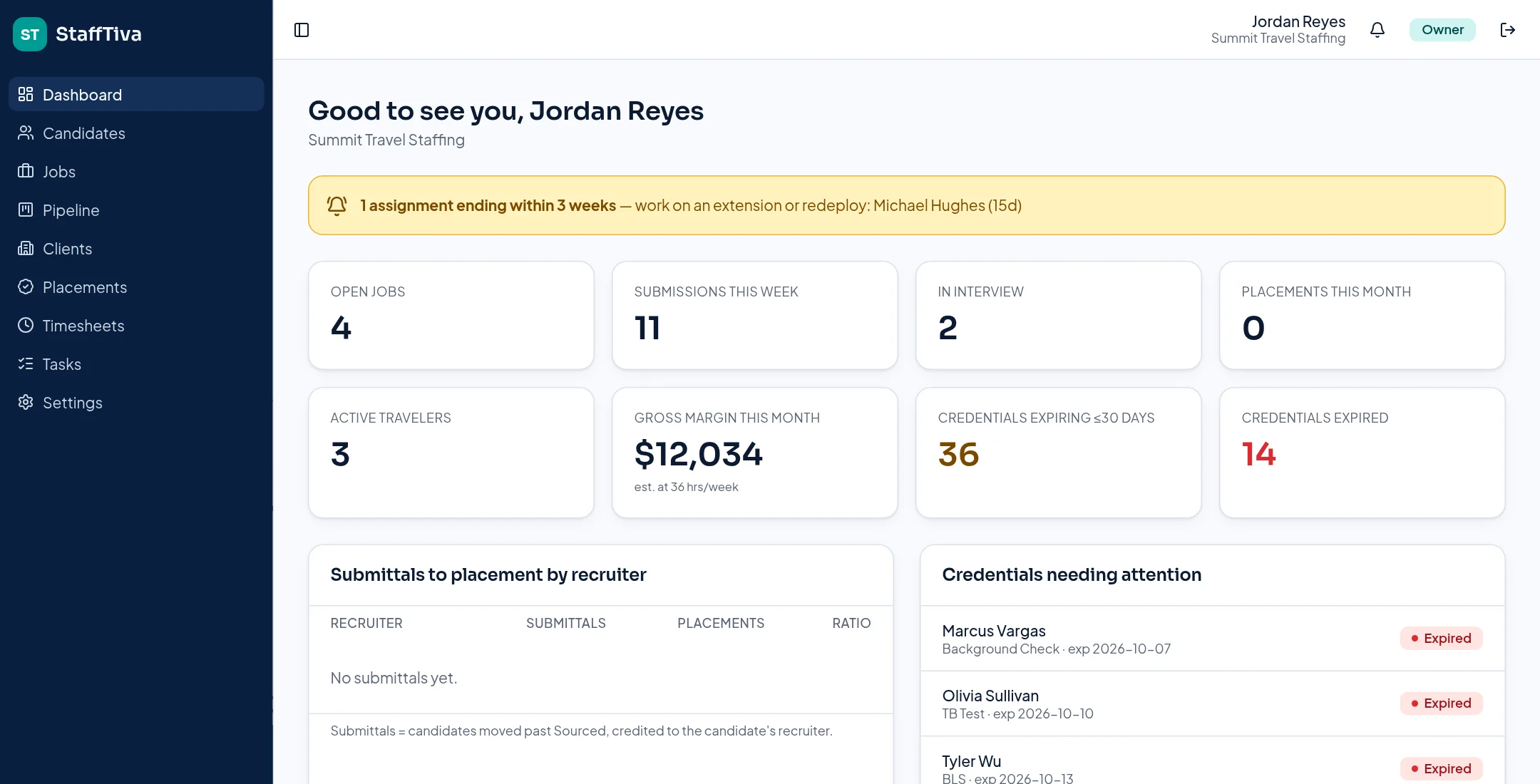
StaffTiva’s owner view connects recruiting activity with estimated margin trends and client-level contribution. StaffTiva demo agency.
02
Compare healthcare workflows, not category labels
Crelate’s healthcare recruiting page describes clinician sourcing, license and certification expiry tracking, recurring checklists and deployment visibility. It also discusses state-specific licenses and screening integrations. A useful comparison should acknowledge those claims rather than presenting Crelate as a generic CRM with no clinical documentation support.
StaffTiva provides a healthcare agency candidate database, job-specific submission pipelines, credential expiry flags, client records and placement tracking. The decision is whether those workflows meet your team’s day-to-day requirements, not whether one vendor uses “healthcare” more frequently in its headline.
03
Examine sourcing and candidate ownership
Crelate describes Discover Agent sourcing and contact enrichment on its healthcare page. Ask what is available in your proposed package and how external results enter your recruiting process. StaffTiva’s AI matching suggests fits from your agency pool when an owner or recruiter requests it; it does not claim an external billion-profile sourcing database or automatic outreach.
Test the same clinical request with both products. Review specialty, experience, state information and availability, then inspect how a recruiter decides what to do next. Candidate data quality and ownership conventions can matter as much as the matching interface.
04
Review recurring compliance and assignment follow-up
Crelate describes recurring requirements that reopen through evergreen checklists, alongside assignment dates and availability. StaffTiva tracks recorded credential expiration dates with status flags and checks job-required credential types before submission. It surfaces placements ending within three weeks for extension follow-up.
These are not identical mechanisms. If recurring training checklists, automated screening or a specific compliance integration is required, test it in the proposed Crelate package and confirm what is actually available in StaffTiva. Neither a recorded document nor a label should be mistaken for independent verification.
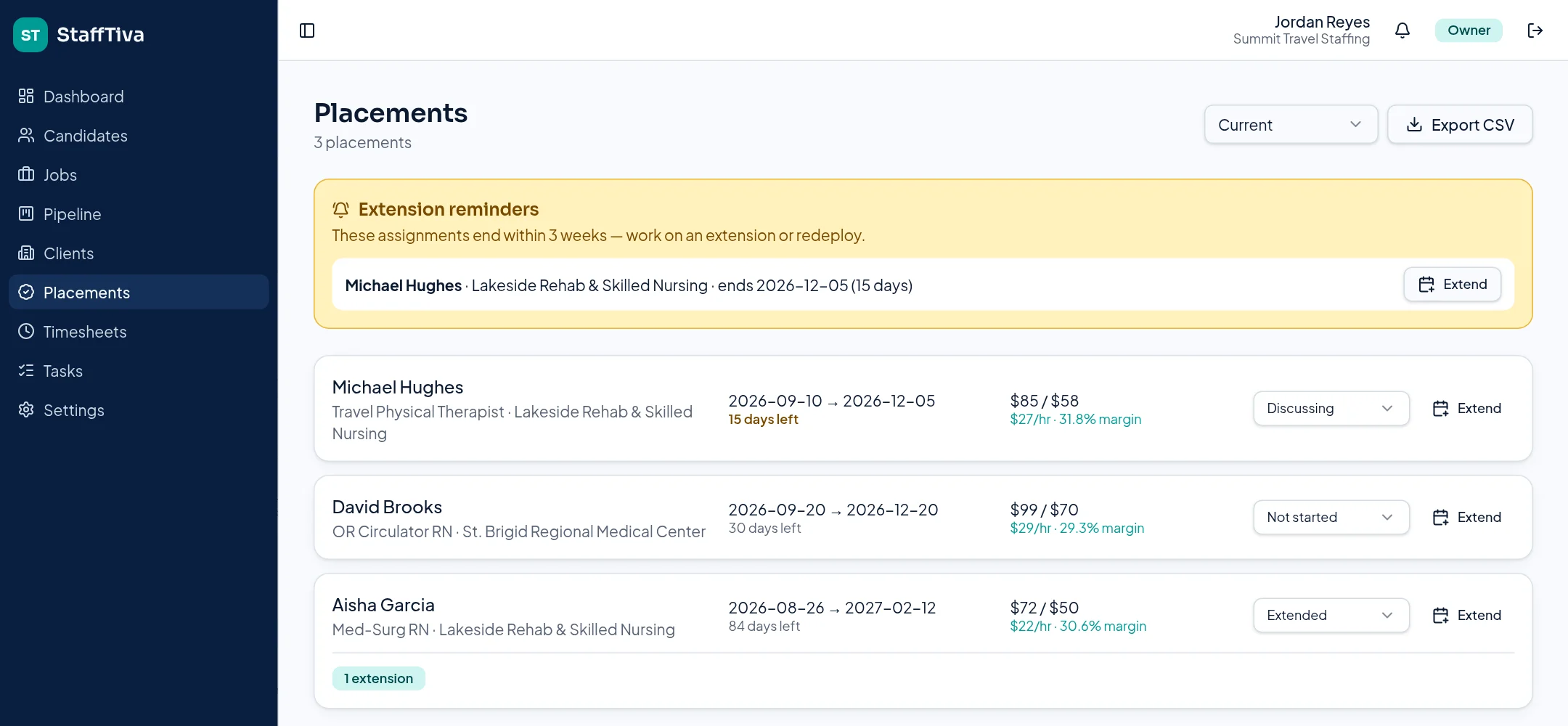
StaffTiva tracks placement dates, rates and extension status after the recruiting decision. StaffTiva demo agency.
05
Published pricing: a five-recruiter example
StaffTiva Starter is $149/month with 2 seats. Five recruiters cost $266/month: $149 plus 3 additional seats at $39 each. Growth is $299/month with 8 seats and adds the Growth feature set, including placement and extension tracking. Choose based on workflow as well as seat count.
Crelate publicly lists Essentials at $85 per user/month, paid annually, with a maximum of 2 users and 20,000 contacts. That tier is not a five-recruiter option. Business lists $119 per user/month with annual or monthly billing: five users total $595/month at the listed rate, before paid modules, usage and services. Business Plus and Platform are custom-priced.
This is a base-license illustration, not feature-equivalent packages or a guaranteed saving. StaffTiva uses a monthly company fee, included seats and published seat add-ons, with no setup fee and a 14-day no-card trial. Crelate uses user-based pricing plus optional capabilities; its onboarding/compliance offering is priced per hire and native e-signature is an additional subscription. Confirm billing terms, screening, sourcing and implementation costs with Crelate.
06
Who should choose StaffTiva vs Crelate
Choose StaffTiva when your healthcare agency already sources clinicians through referrals, its own job boards or an existing database, and wants job-order rate spreads and placement visibility rather than another external sourcing subscription. Use Growth or above when placement and extension tracking are requirements.
Choose StaffTiva when a small owner-led team wants a self-serve workspace, free candidate/client CSV imports and a predictable company fee with included seats. Test your real client, job order and clinician records during the trial before moving the whole agency.
Choose Crelate when external passive-candidate discovery and contact enrichment are central to your sourcing model. Its healthcare page describes Discover Agent; confirm package, usage allowances and the quality of results for your specialties.
Choose Crelate when recurring onboarding checklists, integrated background checks or built-in e-signature are mandatory. Its healthcare offering describes these workflows; StaffTiva does not currently provide those connections or evergreen checklists. Confirm module and provider costs before deciding.
07
Setup in minutes is not a complete migration
StaffTiva’s self-serve signup and agency setup can be completed in minutes once email is confirmed. No implementation appointment is required to open an empty workspace. Candidate and client CSV imports are free; the time to prepare a clean file depends on your existing data. This is not a timed deployment guarantee or a claim that StaffTiva is always faster than Crelate.
Crelate’s pricing lists import/export capabilities and access to Professional Services on Business. Ask whether your proposed implementation is self-serve or assisted and what data cleanup, training and service charges it includes.
For a small migration, allow time to export candidates and clients, map StaffTiva’s template fields, test a small sample and resolve duplicates. Recreate open jobs and active placements separately, retain an archive of attachments and activity history, and run a parallel check before cutover. CSV import does not automatically reproduce Crelate relationships, credentials, attachments or historical submissions.
08
Background checks, drug screening and e-signature: the exact gaps
StaffTiva currently connects to no background-check provider, drug-screen provider or e-signature service. That includes no Checkr, First Advantage, DocuSign or Adobe Acrobat Sign connector. Screening must remain in your agency’s existing external process; storing a document or expiry date is not ordering a check, receiving a result or obtaining a signature.
Crelate’s healthcare page names Checkr and First Advantage for background checks, describes drug-screening status against client requirements, and includes native e-signature and E-Verify capabilities. Drug-screen status tracking is not evidence of a particular laboratory connector: ask Crelate which provider can actually place orders and return results. Its Checkr setup guide requires Business or higher plus Omni Hire; Checkr bills screening separately. Native e-signature is a paid add-on.
StaffTiva is not a clinician payroll engine and has no QuickBooks or payroll-provider connector. CSV exports support a manual handoff; they are not a provider-ready payroll integration. Keep payroll and screening costs in your buying comparison.
09
Current strengths, not uncommitted roadmap promises
No delivery dates or committed public roadmap are confirmed here for external sourcing, recurring evergreen checklists or screening integrations. Do not select StaffTiva on the assumption those features will arrive. Its current strengths are healthcare agency records, live job-order rate spreads, hourly placement economics, published seat-based plans and self-serve CSV setup.
If a screening connection, sourcing tool or signed onboarding packet is a deal-breaker, evaluate a product that provides it now. Bring your exact workflow to a StaffTiva demo so you can verify the available features against your requirements.
Payroll & accounting: what you can export
Keep your payroll and accounting provider. StaffTiva supplies generic CSV files, not QuickBooks, ADP, Gusto or other provider-ready formats. Your team maps the fields, checks worker identities, reconciles hours and rates, and confirms your provider can accept the data.
- Timesheets CSV: candidate, client, job, week start, regular hours, overtime hours, status and notes. Select Approved before exporting approved hours. No pay rates or worker payroll IDs are included.
- Placements CSV: candidate, client, job, start/end dates, bill rate, pay rate, margin per hour, extension status and extension count. Match this separately to the timesheet export; there is no automatic payroll join.
- Not supported: payroll calculation, tax withholding, client invoices, accounting-ledger exports or direct accounting/payroll sync.
Review integrations and gaps, security evidence and the migration checklist before deciding. Verify any required screening, e-signature or scheduling connection independently.
At-a-glance comparison
| Evaluation point | StaffTiva | Crelate: official product description |
|---|---|---|
| Starting price and seats | $149/month company fee with 2 seats; additional Starter seat $39/month | Essentials: $85/user/month paid annually, maximum 2 users; Business: $119/user/month, annual or monthly |
| Five-recruiter base-license example | Starter $266/month with three extra seats; Growth $299/month with 8 seats and Growth features | Business $595/month at the listed rate; modules, usage and services may add cost |
| Live gross margin on job orders | Bill/pay rate spread and gross-margin percentage recalculate as rates change | Publishes reporting and analytics; confirm equivalent live job-order calculation in a demo |
| Placement margin per hour | Recorded hourly rate spread beside placement dates; estimated margin trends and client breakdown | Publishes deployment visibility and advanced placement export; confirm hourly margin and trend views |
| Sourcing | On-request matching within the agency pool | Discover Agent and contact enrichment |
| Credential follow-up | Recorded expiry flags and job-specific checks | Licenses, certifications and recurring evergreen checklists |
| Assignment view | Placement dates, rates and extension follow-up | Assignment dates, availability and compliance visibility |
| Migration | Self-serve agency setup in minutes after email confirmation; free candidate/client CSV import; validate remaining records | Import/export capabilities and Professional Services access on Business; confirm setup scope, time and fees |
| Background checks | No provider connections, including Checkr or First Advantage | Names Checkr and First Advantage; Checkr requires Business or higher plus Omni Hire, with separate screening charges |
| Drug screening | No drug-screen provider connection; retain your external screening process | Describes drug-screening status; confirm laboratory integrations and ordering/result workflow |
| E-signature | No native e-signature or DocuSign/Adobe Acrobat Sign connector | Native e-signature with reusable templates, available as a paid add-on |
Sources & review scope
This StaffTiva-authored guide uses official vendor descriptions, not independent product testing. Packages and capabilities may change; confirm them with each vendor. Table summaries use the sources below.
Questions & answers
Does Crelate track healthcare licenses and certifications?
Its official healthcare page describes license and certification expiry tracking, state-specific license information and recurring checklists. Confirm availability in your proposed package.
Does StaffTiva source external candidates like Crelate Discover Agent?
StaffTiva matching works with your agency’s candidate and job records on request. This page does not claim external profile sourcing or contact enrichment.
Will all Crelate history migrate through CSV?
That is not verified. StaffTiva imports candidate and client CSV records; test history, attachments and related records separately before a switch.
What does Crelate cost compared with StaffTiva?
StaffTiva starts at $149/month with 2 seats. Five seats on Starter cost $266/month; Growth is $299/month with 8 seats. Crelate Essentials lists $85 per user/month paid annually, limited to 2 users. Business lists $119 per user/month, or $595/month for five users before extras. These are different feature packages; confirm modules, usage and terms.
Which screening and e-signature providers does StaffTiva connect to?
None currently. StaffTiva has no background-check, drug-screen or e-signature connector, including Checkr, First Advantage, DocuSign and Adobe Acrobat Sign. Continue using your external providers. Credential date tracking is not independent screening or verification.
Are external sourcing and recurring checklists on StaffTiva’s roadmap?
No committed delivery dates or approved public roadmap for those capabilities are confirmed on this page. Evaluate the current product, not a future feature assumption.
Does Crelate lack margin reporting?
This comparison does not claim that. Crelate publishes reporting, analytics and placement export capabilities. Ask it to demonstrate live job-order rate spreads and hourly placement margin in your proposed package. StaffTiva shows those recorded rate spreads, but they are not net profit.